The Official Blog of System Hacking

Hey, you, visitor, welcome in this blog!
Please, Subscribe to us, you'll be updated when we'll post something of new and interesting!
You can access to all our posts by the Blog Archive, but if you would like to read a post without spending much time looking for it, find it in our Categories: they're subdivided on PSP and PC.
You can discover something else visiting our complete profile> About Us;
Don't worry, all the links to programs or files that we mention into our posts are collected into Download Our Programs.
P.S. Note that you can also follow us on our YouTube Channel, and the videos are all selfmade by us!
Enjoy!

The Hackers

The Hackers
Contact Us: 5starhacks@gmail.com

You found this Blog...

Tuesday, December 22, 2009

Spy Browsers! How to remove spies from your PC

Hi guys! Here I am...
I prepaired another guide for you, now saying about something of dangerous...Ahaha! Don't worry, not too dangerous as you thought! But it'll be cautionous do what I'm telling you:
Let's talk about Browsers, every day you visit websites, you search in the Internet...Don't you know that theese usual activities you do on Browsers are always spied?!? I think no...
Most of the Browsers, like Internet, Firefox, Opera and, first of all, Google Chrome, send to their houses of production lots of private informations about you and your PC, like visited websites, searches and programs installed on your PC!
The problema lies in the temporary files of Browsers, that should be deleted periodically, but only experts can find them into strange folders...The soluction for everybody is AntiBrowser Spy, a free software that finds all dangerous files of Browsers and makes a clean up, making your PC protected. The guide for installation and use is the following:

  1. Download and install the program; Download it HERE
  2. Register your version of AntiBrowser Spy, an e-mail will be sended to your e-mail address with your unlock code
  3. Insert the unlock code and open the program
  4. Before running the programs make sure you've got all browsers turned off
  5. Remember! Don't check for updates, the program will find a latest version that will become a trial for 30 days!
  6. The Status Summary shows you how much your PC is affected by spy functions
  7. Move to AntiSpy and click on Click here to configure your Browsers
  8. Click on Set Browsers to their recommended values
  9. Move to Clean Up and click on Click here to configure your browsers
  10. Click on Perform Full Clean Up.


Saturday, November 7, 2009

PC Tutorials - Firefox: The Best Scripts for Greasemonkey

Hi guys! Here's our latest video about the best Greasemonkey scripts on Firefox! Enjoy watching how to transform your most used websites like YouTube, Facebook, Twitter, Google and Travian in better than what they're actually are...

Sunday, October 25, 2009

PC - Tutorials - Operating System Mooding

Hello! Here's another interesting tutorial about O.S. Mooding: you can learn how to change the boot skin and the logon screen on Windows. You can find the links to the programs in our tab "Download Our Programs".

PC Tutorials - How to erase Banners, Pop - Ups, etc. on the Web

Hi! Every body wished to surf the Internet without wasting much time closing pop-up windows. Here's an easy tutorial that will resolve this annoying problem: Enjoy!

Sunday, October 18, 2009

PSP Tutorials - How to Play Gameboy Roms on PSP


IN this video you'll find how to play the OLD gameboy on your NEW psp !!!
JUST FOLLOW THE VIDEO AND DO AS IT SAYS ....

Friday, October 16, 2009

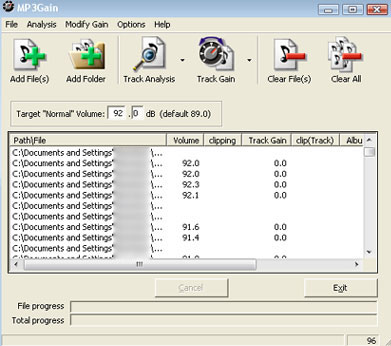
PC Tutorials - Normalize your MP3 Volume ITA


How to normalize your MP3 volume using MP3Gain! Very easy to do!

PC Tutorials - The Professional Audio/Video Converter ITA

Here's our video, it shows how to convert audio/video files very fastly and as real PROs.

PSP Tutorials - How to make a Magic Memory Stick

PC Tutorials - How to use JDownloader - EN

Hello! This post is for English people who would like to know how to use JDownloader, the easiest and the fastest program to download from the Web. We've already posted the link to the video, bu, unfortunately, t it was in Italian. Here's a complete guide to the program:
1) Dwnload:
Download the program at this link and then install it on your PC:
http://www.jdownloader.org/
2) Founding Links:
Next step is finding the links for your downloads on the Web: JDownloader ISN'T a File Sharing program, but a download manager, so it doesn't search you the files you would like to download, you have to do this operation by your own: so, first open your Browser (I recommend Internet Explorer or Mozilla Firefox), then go to Google and here's the problem; you have to find the website that posts the link for the file you like. These links are from File Hosting Websites, like Megaupload, Rapidshare, Easy-Share, Storage, Deposit Files and many many others...These are the best ones; But how do we find these links? So, now be careful because it's dangerous doing this: First of all, search your file from Google; a special mode to better find your file is using the parameter "+", put the "+" before the name of the file you have to download and before the name of the file hosting website, so for example a name should be like this: +anime studio pro +megaupload. Then press Enter: there are many results, but which is the right one? This is by your choice, many ones may be sure, but many may not. You should base on the reliability of the website that posts the links. A piece of advice: don't go into rapidlibrary! It should appear safe but it isn't! I recommend you to install Crawler Toolbar that automatically values google results and says which websites are recommended and which not. It's really helpful not to fall into fakes like viruses or porn.
When you found a good website whith the link to your file don't copy it in your website bar, just copy it and JDownloader will automatically capture it and it will show the size of the file and if it's still online, so if it's all right you have to click on the "Play" button to start downloading your file. Just wait a few minutes and you're file will be downloaded!
3) Reconnection:
The strenght of JDownloader is that it bypasses the codes for the file hosting free users, that should have limits of time and daily downloads. Using riconnection JDownloader changes your IP so you can download whatever you want without limits! This operation is a bit difficult, but you have to do it just one time, then it will start automatically everytime you have exceeded the file hosting limits. So, first thing open JDownloader and go into the Settings tab; click on Riconnection on the left side, then click on Select Router: if you find your router in the list you just have to select it and click on Change IP; if the operation have success will appear a smiling face. If your router isn't in the list, click on Obtain IP Router and then on Create Riconnection Script; a new page on the browser will be opened, and it will show the status of your router. Click on the button that disables your Internet connection, then turn on JDownloader and click on Change IP. If a smiling face will appear at the end of the process, that may take about 1/3 MINUTES, you done. Be sure that the first time you do this you haven't got any downloads in process, because thay'll be restarted. So stop you're downloads before doing your firts riconnection. The next times riconnection will start automatically.

That's all boys, we hope it's all right...any doubt you have please report.
Comment and Vote!

PC Tutorials - Unlimited Downloads

You always wished to avoid the long waiting codes on E-Mule or the slow speed on file sharing programs, like LimeWire...Now you're problem is solved: here's the soluction, his name is JDownloader and it's the fastest download manager on the web...Italian video subtitled in English!
1) Download program at this link (after this install it on your PC):
http://www.jdownloader.org/
2) Find your Megaupload/Rapidshare...links on the web (this is the most difficult part because you must be really careful while searching these links, so be patient doing this annoying work! You may fall in a dangerous fake...) If you're not sure how to do this work by your own have a look at these guides:
How to use JDownloader
and to find links
3) Once you found the link you need (you can download everything: film, music, photos, programs...) you just have to copy it and JDownloader will automatically capture it, you just have to start the download and in a few minutes, here's your file!


PC Tutorials - Record your TV Channels ITA

Hello to everybody! Here's a video that shows you how to record your favourite TV programs, films or anything else on TV only using your PC...witohut using it! Very easy to do...

PC Tutorials - Facebook Hacks ITA HD


Hey guys! Here's our first tutorial about Facebook: I make sure you'll learn somethings of really interesting and special...Enjoy!

Thursday, October 15, 2009

An overview of the Blog

Hello everybody! Welcome in this new blog...it may look very simple but we make sure that it's really helpful and foremost useful, it's full of features you'll never find anywhere, and it's really rich of informations! Don't undervalue it!

Our strenght is creating video - tutorials (In English too!) to better explain what's written into our posts, that may often appear hard to apply. Hey, you can always follow us on YouTube. Just look for stream94 Channel, where all of our videos have been updated.

So, first of all we're going to show you how this blog is planned; you can have a look to all our articles to realize that there are lots of things you can learn about PC and PSP you've never expected to know. Also we'll note many links to cracked programs, games and whatever about PC and PSP. You may subscribe to be updated about our posts and not to lose news.

We're going to insert many special features to entertain our visitors and to keep our blog nice and not too much annoying...

Please we strongly recommend to refer broken links and any suggestion is accepted...

Finally: most of our videos will be in English, but it may happen that some of them will only appear in Italian, especially among the firsts, so don't be angry about this, we always do our best to translate our posts and videos!

We hope you enjoy!

Wednesday, October 14, 2009

INTRODUCTION


Hi, guys !!! Now you're visiting the best hacking blog about PSP & PC !!!

HERE !!! You'll find everything you were serching for PSP & PC;

They are tutorials, Programs, FREE games, links for downloads

EVERY THING !!!